Get 5 hours back every week.
Knock doors with a map, not a clipboard
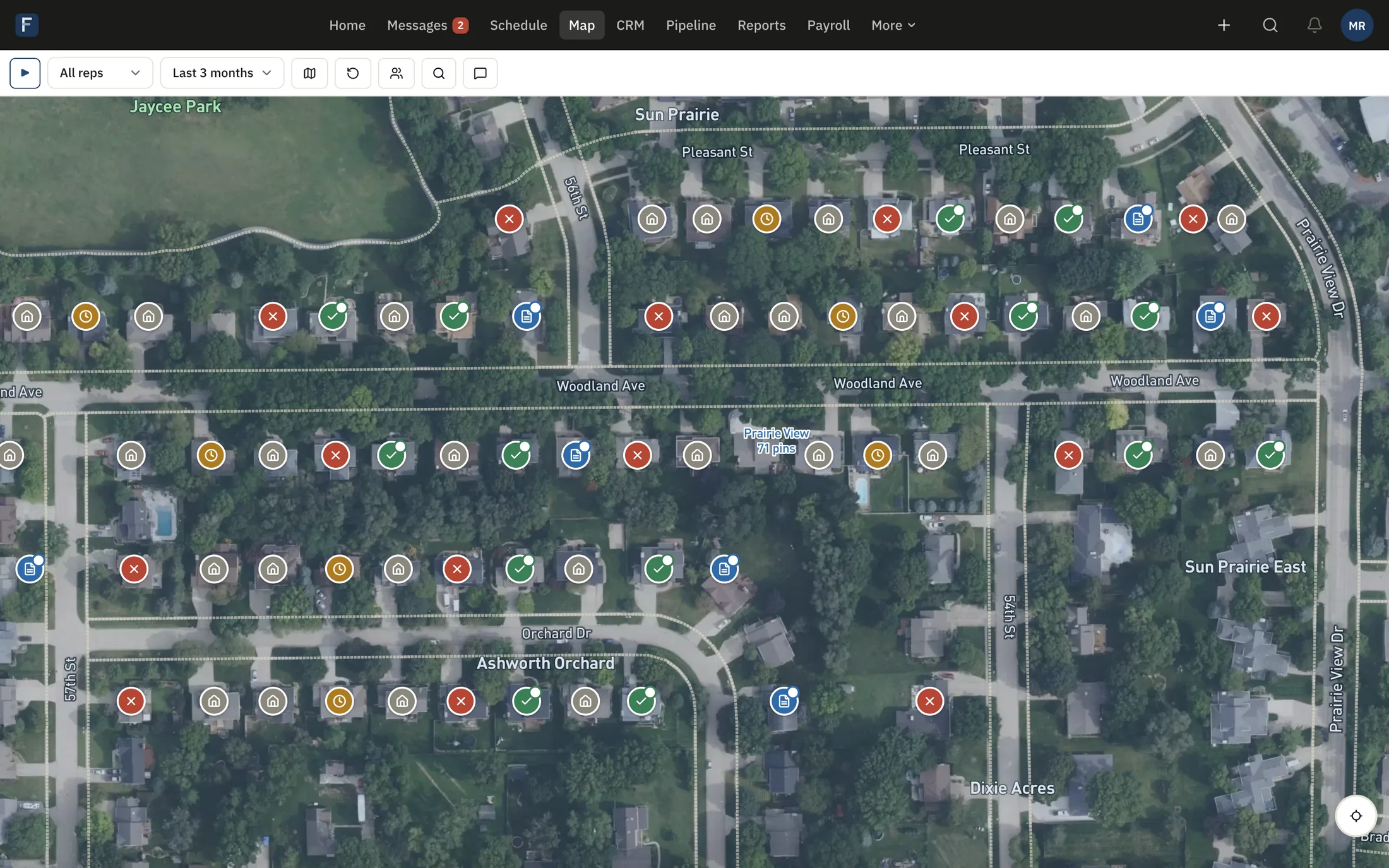
Every house is a pin on the satellite map. Tap it after you knock: not home, not interested, quote, sold. You see which streets you've covered and what each rep did today. Measure a driveway, roof or house from the satellite for a quote without driving out.
Jobber and Housecall Pro: no door-knocking map.
Your numbers, without the nightly spreadsheet
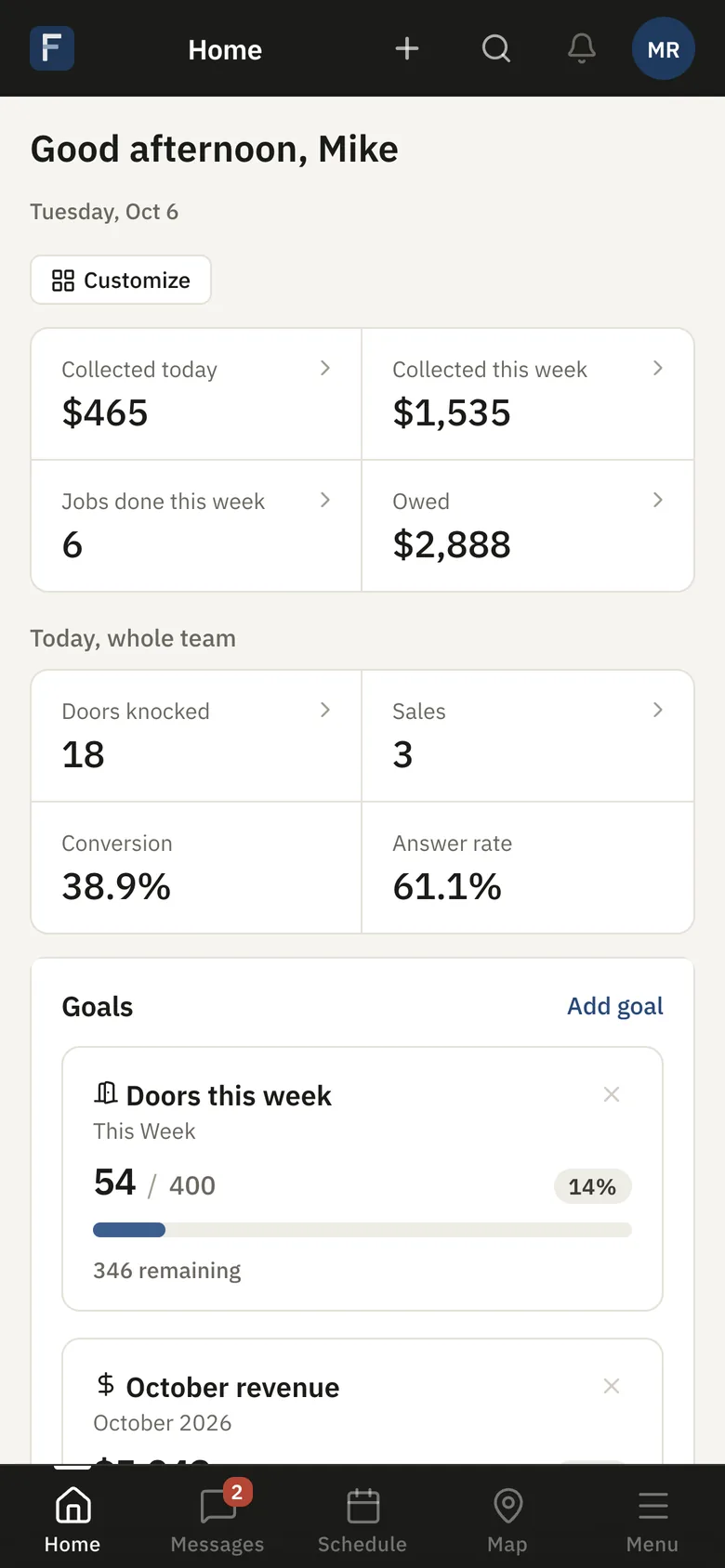
Collected today, collected this week, what's owed, doors knocked, answer rate and sales by rep, on the first screen you open. Set a goal for doors or revenue and watch it fill.
Jobber and Housecall Pro: no door-knocking reports.
Every lead, from first knock to booked job
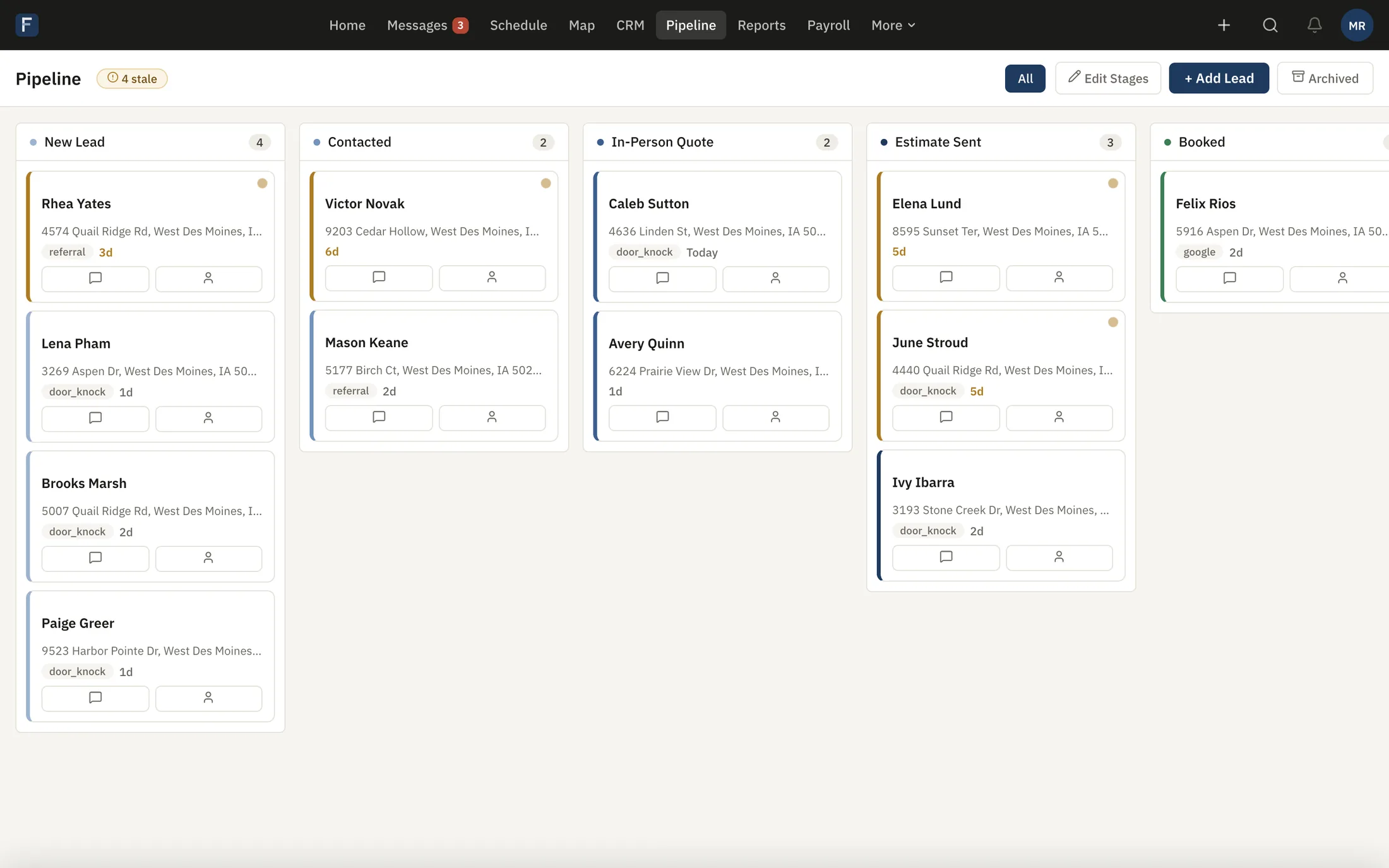
New lead, contacted, quoted, booked. Leads from your door knocking, your website form and your Facebook and Instagram lead ads land in the same pipeline, so nobody falls through the cracks.
Jobber: pipeline is a $49/mo add-on below Plus. Housecall Pro: add-on.
Quotes that sell the extra work and chase themselves
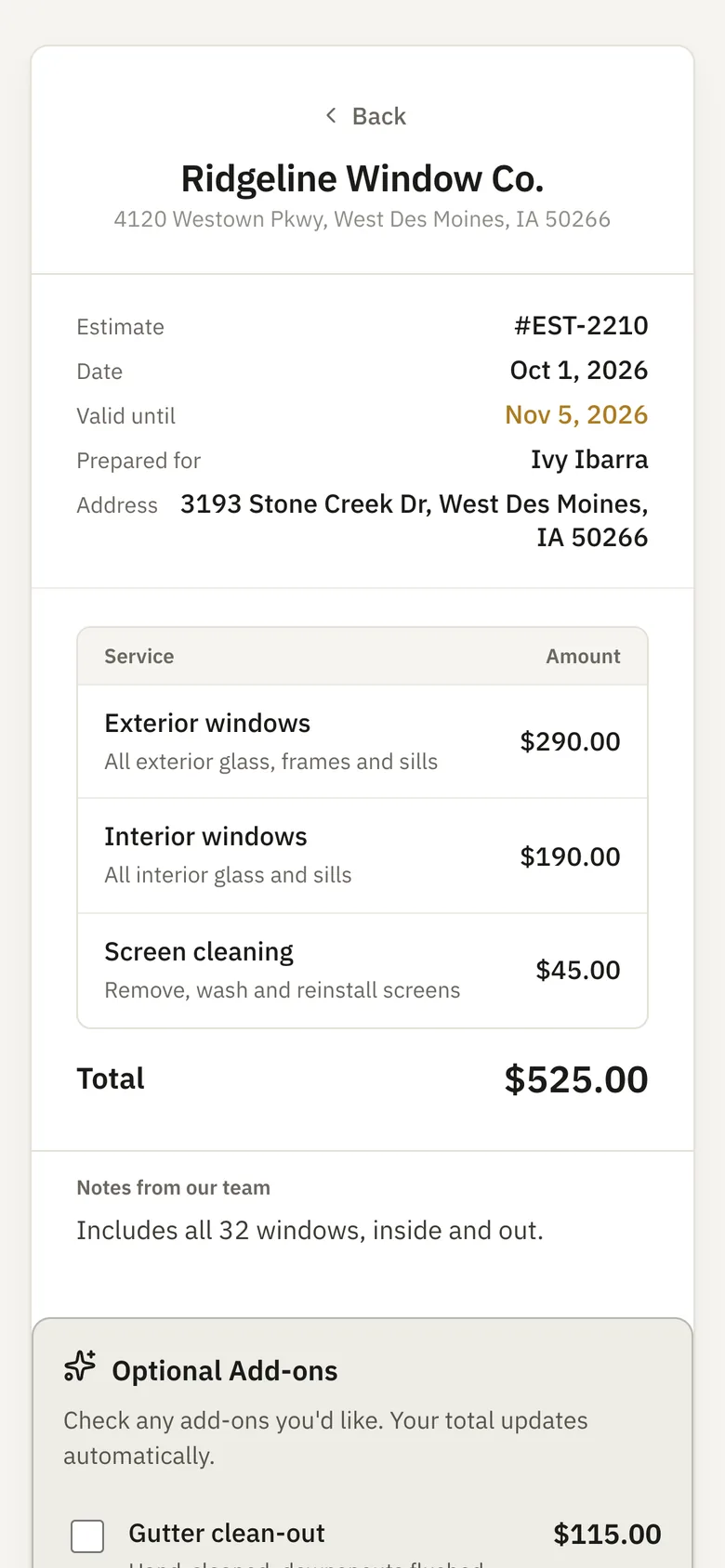
Send an estimate with optional add-ons the customer can tick, an e-signature and a deposit. If they don't answer, Fieldset follows up for you. Unpaid invoices get reminders, and paid ones get a review request.
Jobber: follow-ups start on the Connect plan at $139. Fieldset: every plan, from $99.
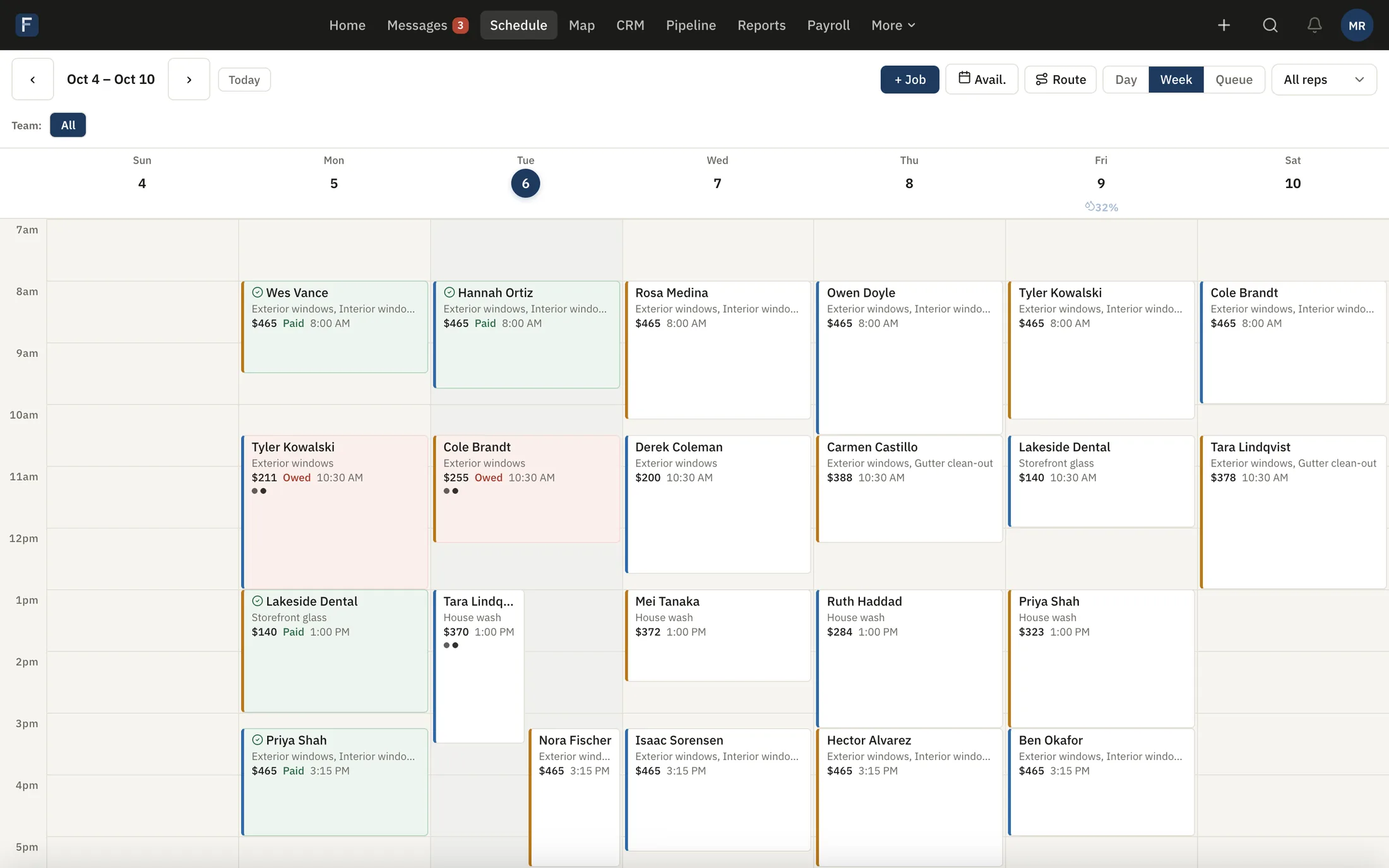
The week for every crew, in driving order
Each crew member has a color. Drag a job to move it. Route planning puts the day in driving order, paid jobs turn green and owed jobs turn red.
Jobber: route planning from the Connect plan. Housecall Pro: Max plan only.
Ask Claude or ChatGPT about your business
Connect your AI assistant and ask it to look up a customer, check tomorrow's schedule or draft an estimate. It works with your real Fieldset data, and drafts wait for you to review before anything is sent.
How the connection worksFrom owners who made the switch
No other CRM lets me do what this one does. Pipeline, customer database, voice recording: every single thing a service business needs. Built by business owners, for business owners.
 Gavin PhillipsOwner, Premier Exterior Care
“Switched from Jobber and haven't looked back. Everything we need is actually there, and it doesn't cost more every time we add someone to the team.”
 Noah JamesOwner, Dr. Panez Exterior Cleaning
Side by side
As of October 25
Door-knocking map
- Fieldset
- All plans
- Jobber
- None
- Housecall Pro
- None
Door-knocking reports by rep
- Fieldset
- Pro plan
- Jobber
- None
- Housecall Pro
- None
Measure square footage on satellite
- Fieldset
- Pro plan
- Jobber
- Not listed
- Housecall Pro
- Not listed
Sales pipeline
- Fieldset
- Pro plan
- Jobber
- $49/mo add-on (included on Plus)
- Housecall Pro
- Add-on
Route planning
- Fieldset
- Pro plan
- Jobber
- Connect plan and up
- Housecall Pro
- Max plan only
Crew pay from hours and commission
- Fieldset
- Pro plan
- Jobber
- Time tracking; payroll via Gusto
- Housecall Pro
- Commissions on Essentials; payroll add-on
Cost per extra user
- Fieldset
- None
- Jobber
- Priced by team size
- Housecall Pro
- $35/mo after 8
Two-way texting
- Fieldset
- Coming soon
- Jobber
- Grow plan, from $199
- Housecall Pro
- Not listed
Marketing campaigns
- Fieldset
- Scale plan
- Jobber
- $99/mo add-on (included on Plus)
- Housecall Pro
- Add-on
Price for 10 people, with route planning and a pipeline
- Fieldset
- $199/mo
- Jobber
- $348/mo
- Housecall Pro
- $399/mo plus Pipeline add-on
From jobber pricing and housecall pro pricing, checked October 25, 2026. "None" means it isn't part of their app; "Not listed" means it isn't on their pricing page.
Try it with your own crew
We move your data over for you, free, and get you set up on a free onboarding call.